
GST Email Analyzer
AI-powered protection for your inbox
A Gmail add-on that analyzes every email for phishing, scams, and social engineering — so you don't have to.
AI-powered protection for your inbox
A Gmail add-on that analyzes every email for phishing, scams, and social engineering — so you don't have to.
Add GST Email Analyzer to your Gmail in one click from the Google Workspace Marketplace.
Open any email and the analyzer runs automatically in your sidebar.
Get a clear risk assessment with plain-language explanations of what to watch out for.
Every email is analyzed for phishing attempts, social engineering tactics, and suspicious patterns the moment you open it.
Your emails are analyzed and never stored. We only see the email you're looking at, and only while we're analyzing it.
Each email gets a simple Low / Medium / High / Critical rating with a confidence score, so you know how seriously to take it.
No security jargon. You get clear explanations of what looks suspicious and what to do about it.
No new app to learn. The analysis appears right in your Gmail sidebar, right where you read your email.
Uses the same AI technology behind Claude and Gemini to understand context, not just keywords.
GST Email Analyzer works right in your Gmail sidebar — no switching between apps.
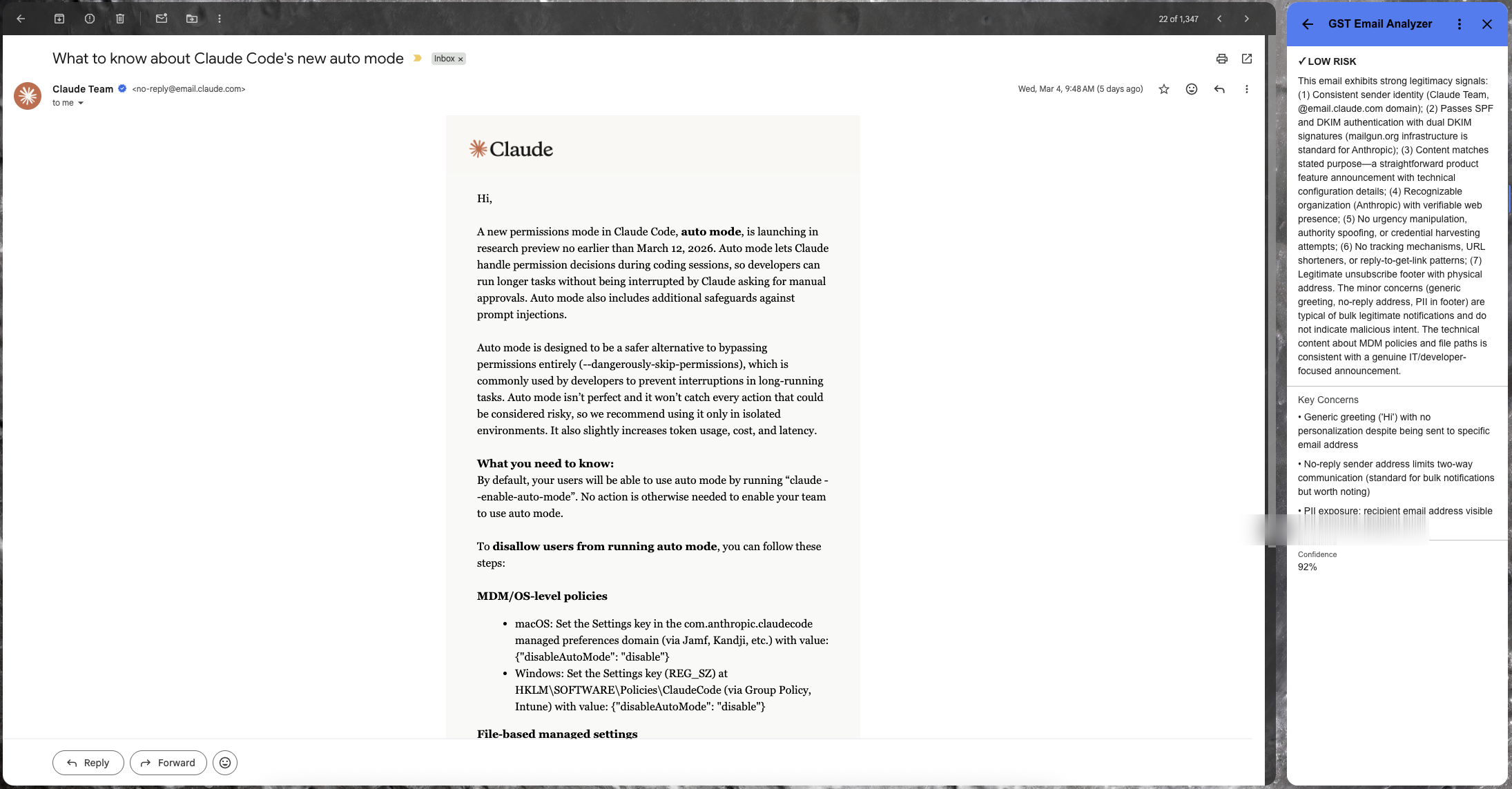
Click to enlarge
Try it free for 5 days. If it's not for you, cancel anytime.
Secure payment powered by Stripe. Cancel anytime.
Only the email you currently have open — the sender, subject, body, and a few headers. We never access your full inbox, contacts, or other data.
No. Your email is sent to our AI for analysis and immediately discarded. We don't store email content anywhere.
We use advanced AI models to read the email the way a security expert would — checking for phishing patterns, social engineering tactics, suspicious links, and other red flags.
Low means the email looks normal. Medium means something is slightly unusual. High means there are clear warning signs. Critical means this is very likely a threat — proceed with extreme caution.
We offer a free trial so you can see how it works before committing. After that, plans start at an affordable monthly rate. See our pricing section above for details.